

Smart Commit
Smart Commit is a Git commit assistance feature provided by CodeBuddy, capable of automatically analyzing code changes and intelligently generating standardized commit messages, helping developers standardize development workflows and improve team collaboration efficiency.
Features
- Intelligent Analysis: Automatically analyze code changes and understand modification intent.
- Standard Generation: Generate commit messages that comply with Conventional Commits specifications.
- One-Click Commit: Simplify the Git commit process and improve development efficiency.
- Multi-language Support: Suggests commit messages in English and Chinese.
Using Smart Commit
Trigger via Git Panel
Click to add single or all files to the staging area. Then click the "AI COMMIT" button on the right of the message box.
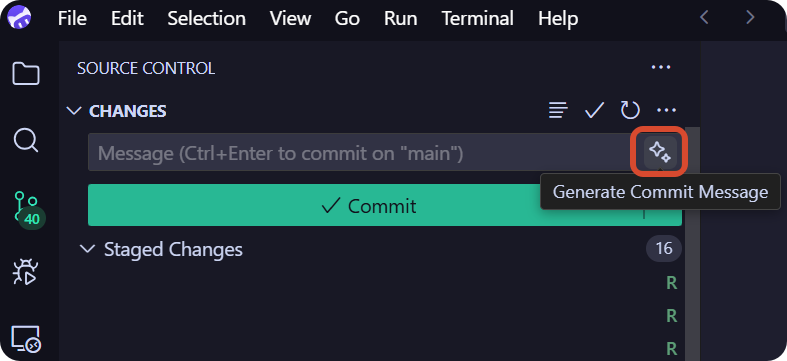
- In the IDE's Git panel, view the file changes pending commit.
- Click CodeBuddy's Smart Commit button.
- The Agent automatically analyzes the changes and generates a commit message.
- After confirming it is correct, click commit.
Commit Message Convention
Smart Commit generated commit messages follow the Conventional Commits specification:
text
<type>(<scope>): <subject>

<body>
Common Types
| Type | Description |
|---|---|
feat | New feature |
fix | Bug fix |
docs | Documentation changes |
style | Code style adjustments (do not affect code logic) |
refactor | Code refactoring (neither new feature nor bug fix) |
perf | Performance optimization |
test | Add or modify tests |
chore | Changes to build process or auxiliary tools |
Example
Suppose you modified the validation logic of the login module, Smart Commit might generate the following commit message:
text
fix(auth): fix error message when login validation fails

- fix issue where error prompt was not shown when username is empty
- optimize prompt text for incorrect password
- add limit for failed login attempts
FAQ
How to modify the generated commit message?
The generated commit message can be manually edited before committing, allowing adjustments based on the actual situation.
Which Git operations are supported?
Smart Commit mainly supports:
- Generating commit messages
- Executing git commit
- Can be used in conjunction with other Git operations (such as push, merge, etc.)