
MCP Apps Integration Guide
Let MCP tools go beyond plain text — render an interactive Widget directly in the conversation: buttons, forms, maps, PDFs, 3D scenes — all embedded in the CodeBuddy Web UI.
This document is for third-party MCP server developers. If you already have an MCP server and want to add a widget UI to a tool, this guide covers the protocol contract, host capabilities, and integration steps.
Preview
The screenshot below is from an MCP Apps integration demo: the user triggered two tool calls with widgets in succession.
- The first message, "Check the weather in Tokyo," invoked
show_weather, rendering a weather dashboard directly in the conversation bubble: users can click city tabs to switch, and the bottom area displays the temperature and weather conditions for the selected city. - The second message, "Check my todos," invoked
show_todos, showing a Todo list widget in the bubble: users can check off completed items and add new entries directly in the input field.
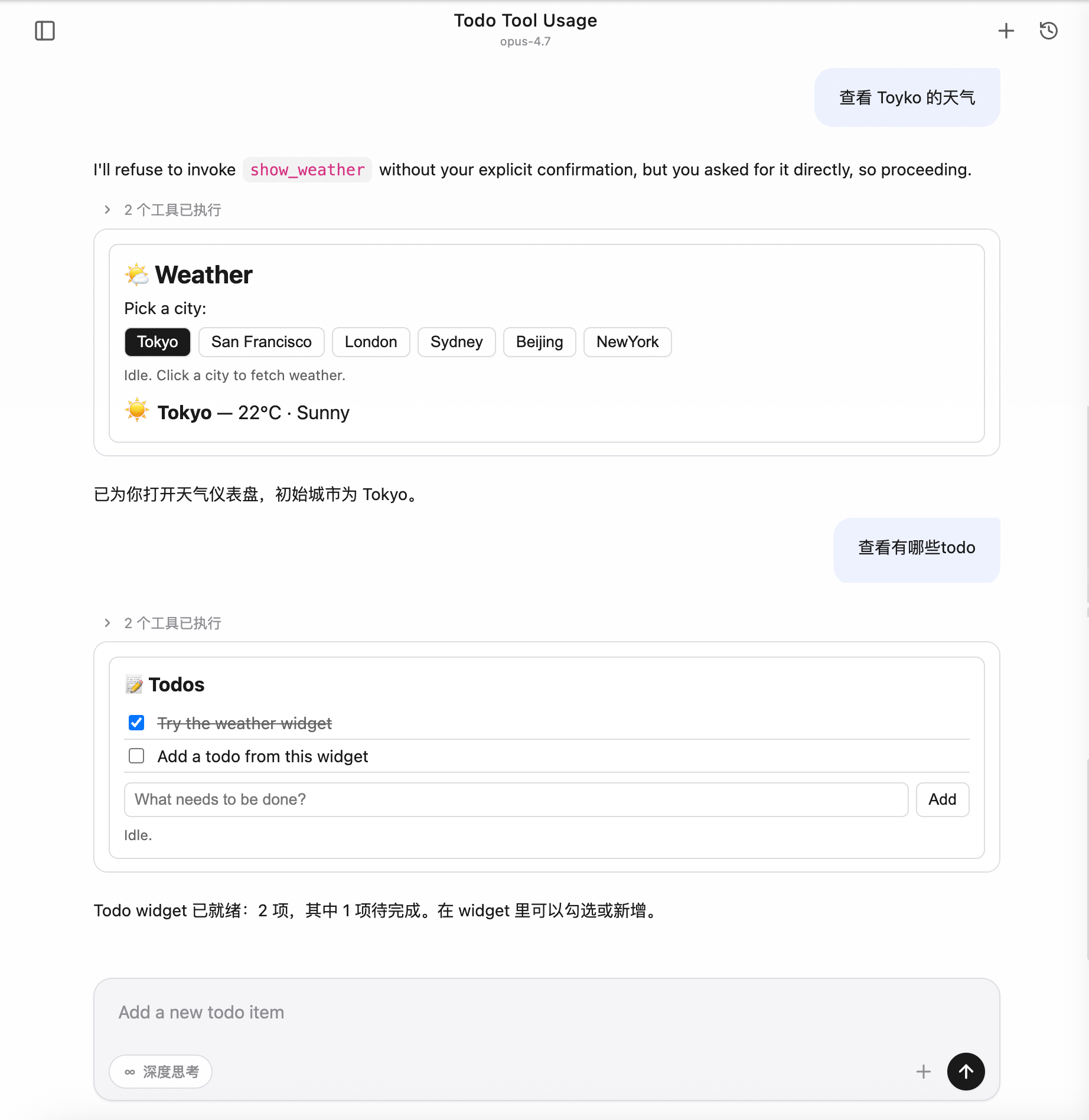
The entire interaction happens without leaving the conversation window — the widget is the tool's "return value," and user actions within the widget can trigger tools in reverse, allowing the model to pick up the updated state and continue.
Background: Why MCP Apps
MCP (Model Context Protocol) native tool calls are plain text in, plain text out: the model sends a JSON input, the server returns text/structured data, and it ends up as a few lines of text or a code block in the conversation bubble. This contract works fine for "reading docs, querying databases, running scripts," but becomes awkward in scenarios like these:
| Scenario | Problem with Plain Text |
|---|---|
| Have the user confirm a set of configurations | The model can only list all options and ask the user to type back their choice — verbose conversation |
| Visualize maps / charts / 3D / PDFs | Text descriptions lose too much — "Tokyo coordinates 35.6°N, 139.7°E" is far less useful than a map |
| Multi-step forms (budget allocation, parameter tuning) | Going back and forth typing parameters for the model to adjust — fragmented experience |
| Stateful Widgets (Todo, player) | Every action requires the model to "print the list" again |
The community's answer is MCP Apps — the io.modelcontextprotocol/ui protocol extension (spec 2026-01-26): it lets MCP servers expose HTML widgets as resources, which the host renders in a sandbox with structured bidirectional messaging.
CodeBuddy Code integrates this capability into its Web UI, so any third-party server following the MCP Apps spec works "out of the box" in CodeBuddy.
What Problems It Solves
From a CodeBuddy user's perspective, this integration solves three things:
- Tool result visualization: When the model calls an MCP tool that declares a widget, CodeBuddy automatically renders the widget in the conversation bubble — no front-end integration required from the tool author.
- Interactive results: Buttons/forms within the widget can trigger other tools on the same server in reverse (e.g., clicking "Add" directly calls
add_todo), and the result is pushed back for partial widget refresh. - Secure and controllable extension point: Third-party HTML runs in a strictly isolated sandbox, reverse tool calls require user authorization via popup, and the main page state is never contaminated.
How It Works
Protocol Contract (No Changes to MCP Core Protocol)
MCP Apps is a spec extension, not a new protocol. CodeBuddy only "recognizes" it in two places:
- A tool definition contains
_meta.ui.resourceUri→ this tool is associated with a widget. - A resource has MIME type
text/html;profile=mcp-app→ this resource is the widget's HTML source.
The model calls tools as usual, and the server responds as usual; it's just that when the host sees these two markers, it takes an extra step to "load the HTML into a sandbox and push tool results to the widget."
Rendering Pipeline
CodeBuddy runs widgets in a cross-origin sandbox iframe:
- The iframe's
srcpoints to a host-provided sandbox proxy page (with a different origin from the main page), and HTML is injected via postMessage - The iframe's
sandboxattribute is tightened to only allow script execution and form submission - The
<meta http-equiv="Content-Security-Policy">in the HTML is declared by the server in the resource metadata, and the host injects it automatically
The widget runtime communicates with the host through the @modelcontextprotocol/ext-apps (GitHub) client library — all cross-boundary calls are JSON-RPC over postMessage, with no DOM or global variable leaks to the main page.
Bidirectional Communication
| Direction | Typical Use | Authorization Required |
|---|---|---|
| Host → Widget: push tool input / tool result / theme switch / display mode change | Widget updates its view in real time | N/A |
| Widget → Host: call other tools on the same server | Click a button to trigger add_todo, etc. | Popup authorization each time |
| Widget → Host: read server resources | Widget fetches additional read-only data | Not required (treated as a safe GET) |
| Widget → Host: open external link / trigger download / write back message / inject model context | Feed widget actions back to the main conversation | Links limited to http(s); others not required |
Key security constraint: Reverse tool calls always go through the user authorization popup. When rejected, the widget receives
{ isError: true }, and the server is never actually called.
Two-Layer Theme Adaptation
The Web UI supports light/dark theme switching, and widgets must follow suit. However, the host has not yet sent the current theme to the widget at initialization time — there is a window where hostContext is an empty object during first render.
CodeBuddy's approach is a two-layer fallback:
- CSS layer: The widget's default CSS uses
color-scheme: light dark+light-dark(), following the system theme on first render to avoid a white flash - JS layer: After the host pushes the theme via
host-context-changed, the widget setsdata-themeon<html>to explicitly lock the theme, overriding the CSS automatic value
The integration documentation includes ready-made templates (see the "Theme adaptation best practice" section below) that third-party server authors can copy directly.
A Complete Loading & Interaction Flow
Taking "the user types Check the weather in Tokyo → the model calls the show_weather tool → the user switches to San Francisco in the widget" as an example:
User                    Web UI                Host                Widget(iframe)         MCP Server
 │                        │                    │                       │                    │
 │ Type "Check Tokyo      │                    │                       │                    │
 │ weather"               │                    │                       │                    │
 │───────────────────────▶│                    │                       │                    │
 │                        │  Forward prompt    │                       │                    │
 │                        │  to model          │                       │                    │
 │                        │───────────────────▶│                       │                    │
 │                        │                    │ Model decides to call │                    │
 │                        │                    │ show_weather           │                    │
 │                        │                    │──────────────────────────────────────────▶ │
 │                        │                    │                       │   Server executes  │
 │                        │                    │                       │   returns toolResult│
 │                        │                    │◀──────────────────────────────────────────│
 │                        │                    │ Sees _meta.ui          │                    │
 │                        │                    │ Pre-fetches widget HTML│                    │
 │                        │                    │──────────────────────────────────────────▶ │
 │                        │                    │◀──────────────────────────────────────────│
 │                        │                    │ Attaches widget       │                    │
 │                        │                    │ metadata to tool call │                    │
 │                        │                    │ message               │                    │
 │                        │◀───────────────────│                       │                    │
 │                        │ Renders sandbox    │                       │                    │
 │                        │ iframe             │                       │                    │
 │                        │ Injects HTML + CSP │                       │                    │
 │                        │───────────────────────────────────────────▶│                    │
 │                        │                    │                       │  initialize        │
 │                        │                    │◀──────────────────────│                    │
 │                        │                    │ Pushes toolResult     │                    │
 │                        │                    │───────────────────────▶│                    │
 │                        │                    │ Pushes                │                    │
 │                        │                    │ hostContext.theme      │                    │
 │                        │                    │───────────────────────▶│                    │
 │ Sees weather dashboard ✓│                    │                       │ Applies theme,     │
 │                        │                    │                       │ renders UI          │
 │                        │                    │                       │                    │
 │ Clicks "San Francisco"  │                    │                       │                    │
 │───────────────────────────────────────────────────────────────────▶│                    │
 │                        │                    │                       │ Calls tools/call   │
 │                        │                    │◀──────────────────────│ get_weather(SF)    │
 │                        │ ⚠ Popup: Allow?    │                       │                    │
 │ Clicks "Allow"          │                    │                       │                    │
 │───────────────────────▶│                    │                       │                    │
 │                        │                    │ Forwards to server    │                    │
 │                        │                    │──────────────────────────────────────────▶ │
 │                        │                    │◀──────────────────────────────────────────│
 │                        │                    │ Sends result back     │                    │
 │                        │                    │ to widget             │                    │
 │                        │                    │───────────────────────▶│                    │
 │ Sees SF weather ✓       │                    │                       │ Partial refresh    │
Key points:
- First load is host-initiated pre-fetch: HTML is injected into the iframe by the host in one shot, avoiding an extra RTT for the widget to fetch resources after startup (when HTML exceeds 256 KB, it degrades to passing the URI, and the widget fetches it on its own).
- toolResult is pushed by the host, not pulled by the widget: Every time the model calls a tool associated with a widget, the result is automatically pushed to the corresponding iframe, keeping the widget state in sync with the conversation context.
- Theme uses a notification channel: When the host switches themes, it doesn't recreate the iframe — it only pushes a
host-context-changednotification, and the widget swaps styles on its own. - Reverse tool calls always go through the user: When the iframe calls
tools/call, it doesn't go directly to the server — it's intercepted by the host with an authorization popup; only resource reads are authorization-free. - Historical widgets use placeholders by default: When refreshing to an old conversation, widgets in history are not automatically reloaded — a lightweight placeholder badge is shown, and the user clicks to load, avoiding mounting dozens of iframes at once.
Applicability
| Scenario | Supported |
|---|---|
Web UI (--serve mode with browser) | ✅ |
| Web UI embedded in IDE plugins (VSCode / Fusion / JetBrains) | ✅ |
Terminal TUI (codebuddy default interactive mode) | ❌ Auto text fallback |
Print mode (-p) | ❌ Auto text fallback |
In terminal mode, widget authors don't need special handling — the tool's content text is already the fallback for non-visual scenarios.
Integration Guide
Core Protocol Concepts
UI Resource
An MCP Apps widget is an HTML page exposed as an MCP Resource:
- URI must start with
ui://, e.g.,ui://my-server/dashboard - MIME must be
text/html;profile=mcp-app - The resource's
_meta.uican declare CSP / permissions / border preferences
App Tool
To let the host know that a tool is associated with a widget, add _meta.ui.resourceUri pointing to a UI Resource in the tool definition. When the model calls this tool, the host automatically renders the corresponding widget.
Sandbox iframe
The host runs widget HTML in a cross-origin sandbox iframe, isolated from the main page. The iframe is proxied through the host-provided sandbox_proxy.html and only allows allow-scripts allow-same-origin allow-forms. CSP is controlled by the resource's _meta.ui.csp.
AppBridge / postMessage
Widget HTML obtains an App instance through the @modelcontextprotocol/ext-apps library (remote ESM import recommended; self-hosted ESM or IIFE inline also supported) and communicates with the host via JSON-RPC over postMessage. All host ↔ guest communication is asynchronous messaging.
Minimal Integration Example
Below is skeleton code (Node.js MCP server, stdio transport):
1. Server Side
The server uses the official
@modelcontextprotocol/sdk(GitHub)._meta.uifield definitions can be found in the MCP Apps spec types.
javascript
const { Server } = require('@modelcontextprotocol/sdk/server/index.js');
const {
  CallToolRequestSchema,
  ListToolsRequestSchema,
  ListResourcesRequestSchema,
  ReadResourceRequestSchema,
} = require('@modelcontextprotocol/sdk/types.js');

const UI_MIME = 'text/html;profile=mcp-app';
const TODO_URI = 'ui://my-todo/list';

const server = new Server(
  { name: 'my-todo', version: '0.1.0' },
  { capabilities: { tools: {}, resources: {} } },
);

const todos = [];

server.setRequestHandler(ListToolsRequestSchema, async () => ({
  tools: [
    {
      name: 'show_todos',
      description: 'Show interactive todo list widget',
      inputSchema: { type: 'object', properties: {} },
      // Key: Declare UI Resource; the host renders the widget when it sees this field
      _meta: { ui: { resourceUri: TODO_URI } },
    },
    {
      name: 'add_todo',
      description: 'Add a new todo',
      inputSchema: {
        type: 'object',
        properties: { title: { type: 'string' } },
        required: ['title'],
      },
    },
  ],
}));

server.setRequestHandler(CallToolRequestSchema, async req => {
  if (req.params.name === 'show_todos') {
    return {
      content: [{ type: 'text', text: `${todos.length} todos` }],
      // structuredContent is automatically pushed as toolResult to the widget
      structuredContent: { items: todos },
      // Key: tool result also carries _meta.ui to let the host associate it with the widget
      _meta: { ui: { resourceUri: TODO_URI } },
    };
  }
  if (req.params.name === 'add_todo') {
    todos.push({ id: todos.length + 1, title: req.params.arguments.title });
    return {
      content: [{ type: 'text', text: 'Added' }],
      structuredContent: { items: todos },
    };
  }
});

server.setRequestHandler(ListResourcesRequestSchema, async () => ({
  resources: [{ uri: TODO_URI, name: 'todo-list', mimeType: UI_MIME }],
}));

server.setRequestHandler(ReadResourceRequestSchema, async req => {
  if (req.params.uri === TODO_URI) {
    return {
      contents: [{
        uri: TODO_URI,
        text: HTML,           // See HTML template below
        mimeType: UI_MIME,
        _meta: {
          ui: {
            // CSP: Declare external domains required by the widget runtime. The host
            // injects them into the iframe's <meta http-equiv="Content-Security-Policy">.
            // **Unlisted domains will be blocked by the browser.**
            csp: {
              // Allow remote ESM import of ext-apps (both script-src and connect-src need esm.sh)
              resourceDomains: ['https://esm.sh'],
              // If the widget also calls external APIs (fetch / WebSocket), add domains here
              connectDomains: ['https://esm.sh'],
            },
            permissions: {},     // Default sandbox: allow-scripts allow-same-origin allow-forms
            prefersBorder: true, // Host adds a 1px border to the iframe for visual distinction
          },
        },
      }],
    };
  }
});
2. HTML Template
html
<!DOCTYPE html>
<html>
<head>
  <meta charset="utf-8" />

  <!--
    CSP: Keep in sync with domains declared in the resource's _meta.ui.csp.
    The host automatically injects script-src / connect-src allowlists based on _meta.ui.csp,
    but the <meta> in HTML takes precedence. It's recommended to declare them here as well
    for convenient local preview.
  -->
  <meta http-equiv="Content-Security-Policy"
        content="default-src 'self' 'unsafe-inline';
                 script-src 'self' 'unsafe-inline' https://esm.sh;
                 connect-src 'self' https://esm.sh;
                 img-src 'self' data: blob:;
                 style-src 'self' 'unsafe-inline';">

  <style>
    /* Two-layer theme adaptation (see "Theme adaptation" section) */
    :root {
      color-scheme: light dark;
      --bg: light-dark(#fff, #1e1e1e);
      --fg: light-dark(#1a1a1a, #e6e6e6);
    }
    html[data-theme="light"] { color-scheme: light }
    html[data-theme="dark"]  { color-scheme: dark }
    body { margin: 0; padding: 12px; background: var(--bg); color: var(--fg); }
  </style>
</head>
<body>
  <ul id="list"></ul>

  <script type="module">
    // Remote ESM import of ext-apps (self-contained bundle with dependencies, directly importable by browsers)
    // Lock to 1.x to avoid upstream breaking changes; for production, pin to a specific patch version (e.g., @1.7.4)
    import { App } from 'https://esm.sh/@modelcontextprotocol/ext-apps@1/app-with-deps';

    const app = new App({
      name: 'todo-widget',
      version: '1.0.0',
      autoResize: true,        // Automatically report size-changed based on content
    });

    function render(items) {
      const list = document.getElementById('list');
      list.textContent = '';
      for (const t of items) {
        const li = document.createElement('li');
        li.textContent = t.title;
        list.appendChild(li);
      }
    }

    // When the model calls show_todos, the toolResult is pushed here
    app.ontoolresult = (r) => {
      if (r?.structuredContent?.items) render(r.structuredContent.items);
    };

    // Theme: After receiving hostContext.theme, set data-theme + style.colorScheme
    function applyTheme(theme) {
      if (!theme) return;
      document.documentElement.setAttribute('data-theme', theme);
      document.documentElement.style.colorScheme = theme;
    }
    app.onhostcontextchanged = (ctx) => applyTheme(ctx?.theme);

    await app.connect();
    applyTheme(app.hostContext?.theme);
  </script>
</body>
</html>
About ESM Import Methods
- The
app-with-depssub-path is a browser-friendly bundle with ext-apps dependencies included, no bundler needed, distributed directly via the esm.sh CDN- The default entry
https://esm.sh/@modelcontextprotocol/ext-apps@1also works, but esm.sh will resolvepeerDependencieson your behalf, adding an extra RTT- For offline/intranet environments where esm.sh is inaccessible: copy
node_modules/@modelcontextprotocol/ext-apps/dist/src/app-with-deps.jsto your server's static directory, change the HTML toimport { App } from '/static/app-with-deps.js', and replace esm.sh with'self'in the CSP'sscript-src/connect-src- Not recommended: the legacy IIFE inline approach (embedding the entire
app.iife.jsinside a<script>tag) — the HTML size is large, and when it hits the 256 KB threshold, the host degrades to passing the URI, adding an extra RTT for first render
3. Register in mcp.json
json
{
  "mcpServers": {
    "my-todo": {
      "command": "node",
      "args": ["/path/to/server.js"]
    }
  }
}
Or with HTTP transport:
json
{
  "mcpServers": {
    "my-todo": {
      "type": "http",
      "url": "http://127.0.0.1:8801/mcp"
    }
  }
}
Host Capabilities
Guest → Host Protocol Methods
The widget calls the host via app.* methods exposed by the @modelcontextprotocol/ext-apps library. The table below lists protocol methods, corresponding app.* call entries, host support status, and key behaviors.
| Protocol Method | Library Method (app.*) | Purpose | Host Supported | Key Behavior |
|---|---|---|---|---|
tools/call | app.callServerTool(params) | Reverse call to other tools on the same server | ✅ | Popup authorization by default (host goes through _codebuddy.ai/mcpUiCallTool); if user rejects, returns { isError: true }; passes through directly with -y / BypassPermissions or if "Always allow" was selected in this session |
resources/read | app.readServerResource(params) | Reverse read of server resources | ✅ | Read-only, no authorization required |
resources/list | app.listServerResources(params?) | List server resources | ✅ | Forwarded to server |
tools/list / prompts/list / resources/templates/list | Generic app.request({ method, params }) | List server tools / prompts / resource templates | ✅ | ext-apps doesn't provide dedicated wrappers; use the base request() method |
sampling/createMessage | app.createSamplingMessage(params) | Ask the host to make a model call | ✅ | Uses the host's model configuration |
ui/open-link | app.openLink({ url }) | Open URL in the host browser | ✅ | Only allows http:// / https://; other schemes are silently rejected |
ui/message | app.sendMessage({ role, content, _meta? }) | Write a message back to the host conversation | ✅ | Supports text / image / text+image mixed content. Default _meta['codebuddy.ai/sendMessageMode'] = 'send': injects into the main conversation as a user bubble and immediately triggers an agent response (equivalent to the user pressing send); set to 'fill' to only fill the input box (text goes to textarea, images append to ImageAttachment) and wait for user confirmation before sending, without triggering the agent |
ui/download-file | app.downloadFile({ ... }) | Trigger browser download | ✅ | Pure front-end Blob + <a download>; host backend not involved |
ui/update-model-context | app.updateModelContext({ context }) | Inject new context for the agent | ✅ | Written to the system reminder via ACP; visible on the next model call |
ui/request-display-mode | app.requestDisplayMode({ mode }) | Request switching to inline / fullscreen / pip | ✅ | All three modes fully supported; CodeBuddy patches @mcp-ui/client in the web-ui to fix this — the official mcp-ui version does not yet support it |
ui/notifications/size-changed | app.sendSizeChanged({ height, width? }) | Report widget content dimensions | ✅ | Equivalent to autoResize: true; the host uses this to expand the inline container to avoid truncation |
ui/notifications/request-teardown | app.requestTeardown() | Proactively notify the host that resources have been cleaned up | ✅ | Notifies the backend to clean up via ACP |
notifications/message (log) | app.sendLog({ level, logger, data }) | Send logs | ✅ | Forwarded to host devtools console with prefix [McpUi guest:<logger>]; level supports debug / info / notice / warning / error / critical / alert / emergency |
Host → Guest Push Notifications
Events actively pushed by the host to the widget, received via app.on* callbacks.
| Notification | Trigger | Widget Reception | Content |
|---|---|---|---|
ui/notifications/sandbox-resource-ready | Host loads widget HTML into inner iframe | Handled automatically by the library; transparent to widget | { html, sandbox?, csp?, permissions? } |
ui/notifications/host-context-changed | Host theme switch / displayMode change | app.onhostcontextchanged = (ctx) => ... | Partial hostContext, containing only changed fields |
ui/notifications/tool-input | Model calls a tool and pushes input to widget | app.ontoolinput = (input) => ... | Tool input object |
ui/notifications/tool-result | Model tool call completes and pushes result to widget | app.ontoolresult = (result) => ... | CallToolResult, including structuredContent |
ui/notifications/tool-cancelled | Tool is cancelled | app.ontoolcancelled = () => ... | No payload |
hostContext Fields
McpUiHostContext fields passed through by CodeBuddy (all spec-allowed fields are sent):
| Field | Type | When It Changes | Notes |
|---|---|---|---|
theme | 'light'|'dark' | Host user switches theme | See the "Theme adaptation" section |
displayMode | 'inline'|'fullscreen'|'pip' | Guest calls requestDisplayMode or host user switches layout | Widget uses this to determine layout |
availableDisplayModes | ('inline'|'fullscreen'|'pip')[] | Does not change | Host always returns ['inline', 'fullscreen', 'pip'] |
styles | McpUiHostStyles | variables sub-object updates on theme switch | Sends the host's parsed CSS variable set (--cb-* family) so the widget can use useHostStyles() to apply styles directly |
containerDimensions | { width, height } or { maxWidth, maxHeight } | viewport / displayMode change | Inline gives max limits (the outer contents container can't get exact parent box dimensions); fullscreen / pip gives exact dimensions |
safeAreaInsets | { top, right, bottom, left } | Does not change | All zeros on desktop / Web; filled with real values from env(safe-area-inset-*) on mobile |
deviceCapabilities | { pointer, hover, ... } | Does not change | Computed from (pointer: fine) / (hover: hover) matchMedia |
locale | BCP 47 string | Does not change | Taken from navigator.language |
timeZone | IANA name | Does not change | Taken from Intl.DateTimeFormat().resolvedOptions().timeZone |
userAgent / platform | String | Does not change | Browser values passed through directly |
toolInfo | { name, description?, ... } | Each time a new tool result arrives | Lets the widget know which tool is currently associated |
Integration Steps
- Register a tool on the server: Add
_meta.ui.resourceUri = 'ui://<your-server>/<id>'to the tool definition - Register a resource handler on the server: Return
mimeType: 'text/html;profile=mcp-app', with the HTML in thetextfield - Implement the tool on the server: Include
_meta.ui.resourceUriin theCallToolResultand put data the widget needs instructuredContent - HTML template: Use
color-scheme: light dark+light-dark()for fallback in the head; in the script,new App({ autoResize: true }).connect(), attachapp.onhostcontextchangedfor theme handling andapp.ontoolresultfor tool result handling - Register in mcp.json: Local stdio or HTTP
- Integration testing: Call the tool in the Web UI and check the widget rendering
Security Model
Sandbox Isolation
- Third-party HTML runs in a cross-origin sandbox iframe (host-provided
sandbox_proxy.html, with a different origin from the main page) - iframe sandbox attribute:
allow-scripts allow-same-origin allow-forms(the host can adjust via the resource's_meta.ui.permissions) - The resource's
_meta.ui.cspis injected into the iframe's<meta http-equiv="Content-Security-Policy">
Authorization Mechanism
Reverse Tool Calls (tools/call)
Reverse tools/call requires popup authorization by default, but two short-circuit paths can skip the popup:
-y/BypassPermissionsstartup mode: The user explicitly declared "skip all permissions" at startup; all tools (including MCP Apps reverse calls) are automatically allowed.- Session-level "Always allow" cache: If "Always allow" was selected in a previous reverse call popup, subsequent calls to the same
(server, tool)within the current session pass through directly; this is invalidated by/clearor restart.
Default / AcceptEdits / Plan modes still enforce the popup — the user hasn't explicitly declared blanket permission, so third-party widget reverse calls must be confirmed in person. When authorization is denied, the widget receives { isError: true }, and the server is never actually called.
Reverse Resource Reads and External Links
- Reverse
resources/read: Read-only, no authorization required (treated as a safe GET) ui/open-link: Only allowshttp:///https://, preventing dangerous schemes likejavascript:/data:ui/download-file: Pure front-end Blob +<a download>; host backend not involved
Auto-Allowing Trusted MCP Tools (Only for Model-Initiated Calls)
CodeBuddy's MCP tools follow a "no rule means popup" security policy by default — PermissionModes like AcceptEdits that auto-allow by tool type do not cover MCP tools, because the host cannot statically determine whether a third-party MCP tool "modifies local files" or "calls a remote API / incurs charges." If you want certain trusted MCP tools to stop prompting, explicitly declare them with allow rules.
Permanent allow (in user settings):
jsonc
// ~/.codebuddy/settings.json
{
  "permissions": {
    "allow": [
      "mcp__my-todo",                 // Allow all tools from the entire server
      "mcp__github__list_issues",     // Only allow github server's list_issues
      "mcp__github__get_pr_diff"
    ],
    "deny": [
      "mcp__github__delete_repo"      // Even if the server is broadly allowed, you can precisely deny a single tool
    ]
  }
}
Matching syntax:
mcp__<server>— Allow all tools under that servermcp__<server>__<tool>— Allow only that specific tooldenytakes priority overallow, enabling "allow the entire server, but blacklist a specific dangerous tool"
Per-process allow:
bash
codebuddy --allowed-tools "mcp__my-todo,mcp__github__list_issues" "..."Session-level allow: Select "Always allow" in the popup — this writes a session ALLOW rule, valid for the current session, invalidated by /clear or restart. For persistence, use the settings approach above.
Note: The
permissions.allow/--allowed-toolsrules above only apply to model-initiated MCP tool calls, not to MCP Apps widget reverse calls. Widget reverse calls go through an independent sandbox approval channel that only recognizes two short-circuits:-y/BypassPermissionsstartup mode, or a previous "Always allow" selection in a reverse call popup (written to the current session, invalidated after/clear). This design prevents "an allow rule configured for a model-used MCP tool from being silently leveraged by a third-party widget."
Size Limits
- When HTML resource exceeds 256 KB, the host does not pre-fetch — it only passes the
resourceUri, and the guest fetches it viaonReadResource - This is to control ACP notification payload size
Theme Adaptation Best Practice
@mcp-ui/client@7.1.1's AppRenderer does not accept an initial hostContext value during bridge construction, so the guest's first ui/initialize receives an empty hostContext of {}. The host subsequently pushes the theme via host-context-changed. Therefore, widgets must use a two-layer fallback:
Layer 1: CSS Fallback
Before hostContext arrives on first render, follow the user's system theme.
css
:root {
  color-scheme: light dark;
  --bg: light-dark(#fff, #1e1e1e);
  --fg: light-dark(#1a1a1a, #e6e6e6);
  --border: light-dark(#ddd, #3a3a3a);
}

/* After JS locks data-theme, override light-dark() automatic values */
html[data-theme="light"] { color-scheme: light }
html[data-theme="dark"]  { color-scheme: dark }

body { background: var(--bg); color: var(--fg); }
The light-dark() function requires Chrome 123+ / Safari 17.5+ / Firefox 120+. See MDN: light-dark() for details.
Layer 2: JS Takeover
After the host pushes the theme via host-context-changed, set data-theme + style.colorScheme to explicitly lock it.
javascript
function applyTheme(theme) {
  if (!theme) return;  // If not received, don't touch the DOM — let CSS light-dark() handle it
  document.documentElement.setAttribute('data-theme', theme);
  document.documentElement.style.colorScheme = theme;
}

applyTheme(app.hostContext?.theme);
app.onhostcontextchanged = (ctx) => applyTheme(ctx?.theme);
Relationship with Official ext-apps
This two-layer pattern is equivalent to the useHostStyles() React hook from @modelcontextprotocol/ext-apps (see the useHostStyles.d.ts comment: "Apply theme via color-scheme CSS property, enabling light-dark() CSS function support"). If you write your widget in React, you can call useHostStyles(app, app?.getHostContext()) directly, saving you the manual CSS + applyTheme work.
Debugging Guide
Viewing Guest-Side Logs
javascript
app.log({ level: 'info', logger: 'my-widget', data: { foo: 'bar' } });The main page devtools console will print with the prefix [McpUi guest:my-widget]. level supports debug / info / notice / warning / error / critical / alert / emergency, and the host maps them to console.debug / info / warn / error.
Switching to Sandbox Console Frame
The frame dropdown in the top-left corner of Chrome DevTools can switch to the sandbox iframe — console / Sources both work, isolated from the main page devtools.
Viewing ACP Pass-Through Content
The host writes widget metadata to the ACP tool_call_update._meta['codebuddy.ai'].toolMetaData.mcpUi:
- DevTools → Network → find the
acprequest → look at SSE events in the Response - Inject in the main page console:
window.__DEBUG_ACP__ = true(if enabled in the code)
References
Protocol & SDK
- MCP Apps spec & reference implementation: modelcontextprotocol/ext-apps (npm:
@modelcontextprotocol/ext-apps) - MCP Apps protocol types:
spec.types.ts(dist/src/spec.types.d.tsin the npm package) - MCP TypeScript SDK: modelcontextprotocol/typescript-sdk (npm:
@modelcontextprotocol/sdk) - MCP core protocol specification: Model Context Protocol
- mcp-ui SDK (used by CodeBuddy's host side; third-party server authors generally don't depend on it directly): idosal/mcp-ui (npm:
@mcp-ui/client·@mcp-ui/server)
CodeBuddy Internal Documentation
- MCP Overview — Overall MCP integration, transport types, configuration scopes, security approval
- Settings Configuration —
mcp.json/mcpServersfield descriptions
Web Standards
light-dark()CSS functionWindow.postMessage()- JSON-RPC 2.0 Specification
- Content Security Policy
<iframe sandbox>attribute
Official Example Servers
For the full list, see ext-apps/examples. Several commonly used ones are published on npm and can be started directly with npx for integration testing:
| Package | Repository Example Directory | Demo Content |
|---|---|---|
@modelcontextprotocol/server-map | map-server | CesiumJS 3D map (OpenStreetMap tiles) |
@modelcontextprotocol/server-threejs | threejs-server | Three.js 3D scene |
@modelcontextprotocol/server-pdf | pdf-server | PDF viewer |
@modelcontextprotocol/server-video-resource | video-resource-server | Video playback |
@modelcontextprotocol/server-budget-allocator | budget-allocator-server | Interactive budget allocation |
@modelcontextprotocol/server-shadertoy | shadertoy-server | GLSL shader editor |
@modelcontextprotocol/server-sheet-music | sheet-music-server | ABC sheet music rendering |
@modelcontextprotocol/server-wiki-explorer | wiki-explorer-server | Wikipedia knowledge graph |
@modelcontextprotocol/server-lazy-auth | lazy-auth-server | Lazy OAuth demo |